AVIF vs WebP: what Polish websites actually serve
Two in five .pl homepages with images serve WebP, almost none AVIF, and over a quarter lazy-load the first image. What it costs in LCP, plus a checklist.


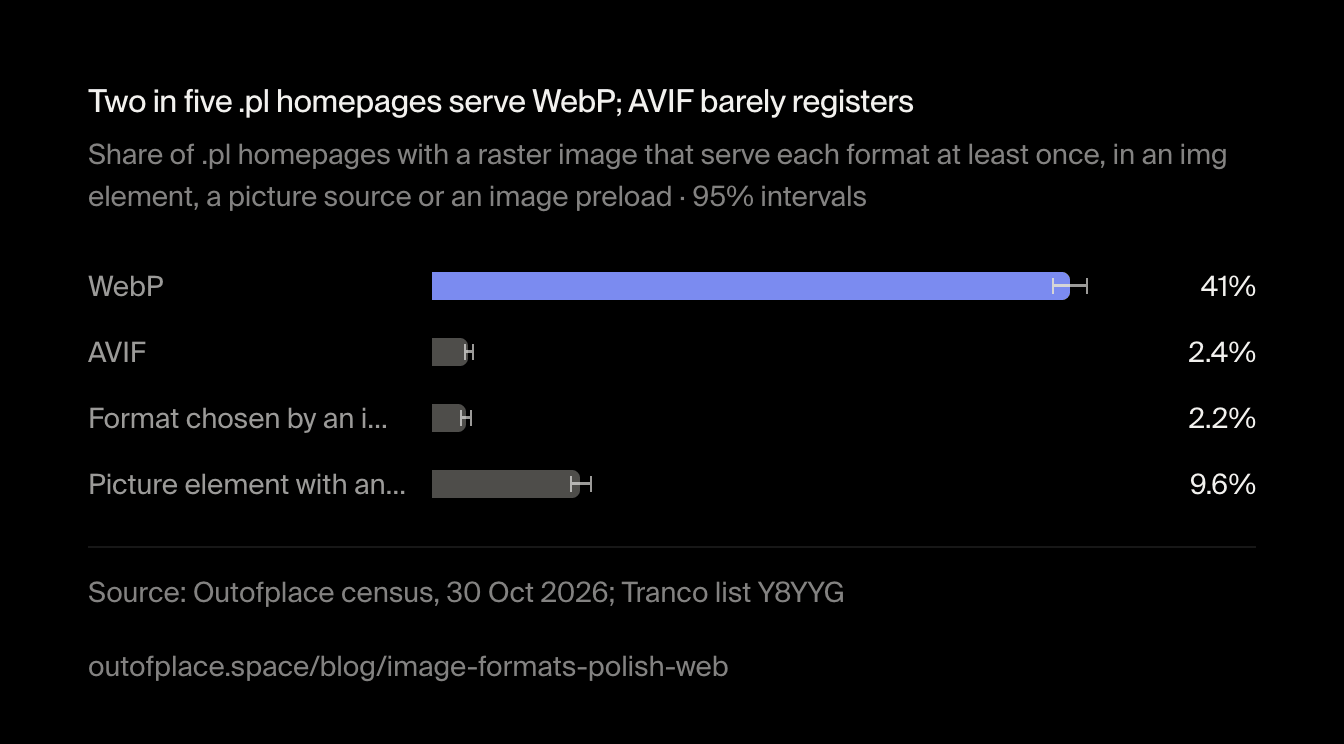
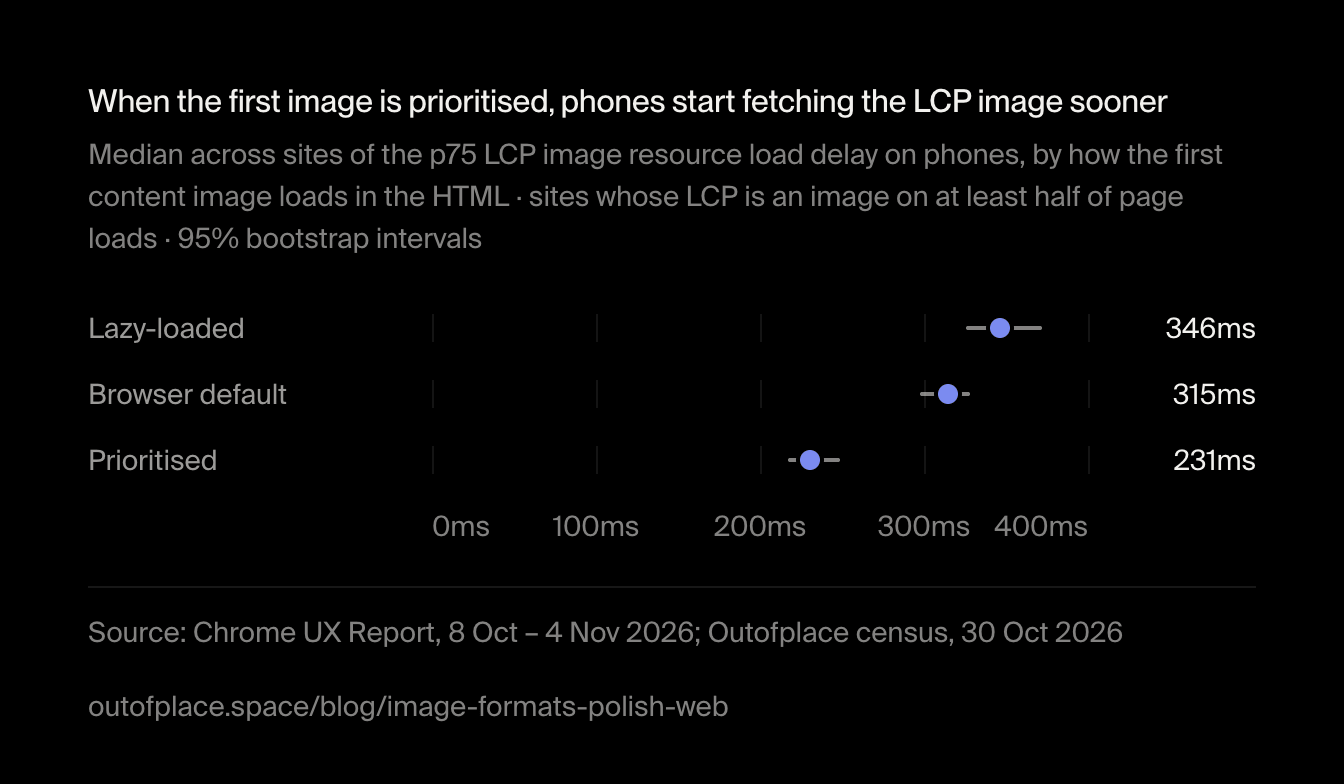
AVIF vs WebP is mostly a question nobody on the Polish web has had to answer yet. Of the popular .pl homepages with images we read, 41% serve WebP somewhere and only 2.4% serve AVIF; JPEG and PNG are still most of the images. The bigger problem is order, not format: on 28% of homepages the first content image is lazy-loaded, and only 15% mark it with fetchpriority="high". Chrome's real-user data shows where that costs time: on sites whose largest element is usually an image, phones start fetching it a median 231ms after the first byte when the first image is prioritised, and 346ms when it is lazy-loaded.
We read the HTML of every .pl homepage in the Tranco list of popular sites (opens in a new tab) that answered on 30 October 2026, the same sample as our study of WordPress and other CMSs on Polish sites, and looked each site up in the Chrome UX Report (opens in a new tab), Google's record of how real Chrome users experience a site. The HTML says which formats and loading hints a page asks for; CrUX says how fast its largest image appears on phones.
- 7,415
- 41%
- 2.4%
- 28%
AVIF vs WebP: what do Polish homepages serve?
We read every <img> on each homepage, with its srcset, the lazy-loading attributes scripts use (data-src and the like) and the <source> elements of its <picture>, and took the format from the file extension, from a format parameter in the URL (format=webp, fm=avif) or from the type of a <picture> source. 6,802 of the 7,415 homepages show at least one raster image (not SVG, not a tracking pixel); every share below is of those.
WebP is the modern format the Polish web adopted: 41% of homepages serve at least one WebP image. AVIF is a rounding error next to it. A small group of sites leaves the choice to an image service whose URL says so (Next.js's /, Cloudinary's f_auto, Cloudflare's format=auto), which then sends AVIF or WebP to browsers that accept them.
Two in five .pl homepages serve WebP; AVIF barely registers
Share of .pl homepages with a raster image that serve each format at least once, in an img element, a picture source or an image preload · 95% intervals
Show the data
| Item | Value | 95% interval | n |
|---|---|---|---|
| WebP | 41% | 40%–42% | 6,802 |
| AVIF | 2.4% | 2.1%–2.8% | 6,802 |
| Format chosen by an image service | 2.2% | 1.8%–2.5% | 6,802 |
| Picture element with an AVIF or WebP source | 9.6% | 8.9%–10% | 6,802 |
The chart as an image, free to reuse under CC BY 4.0 with credit to Outofplace and a link to this page.
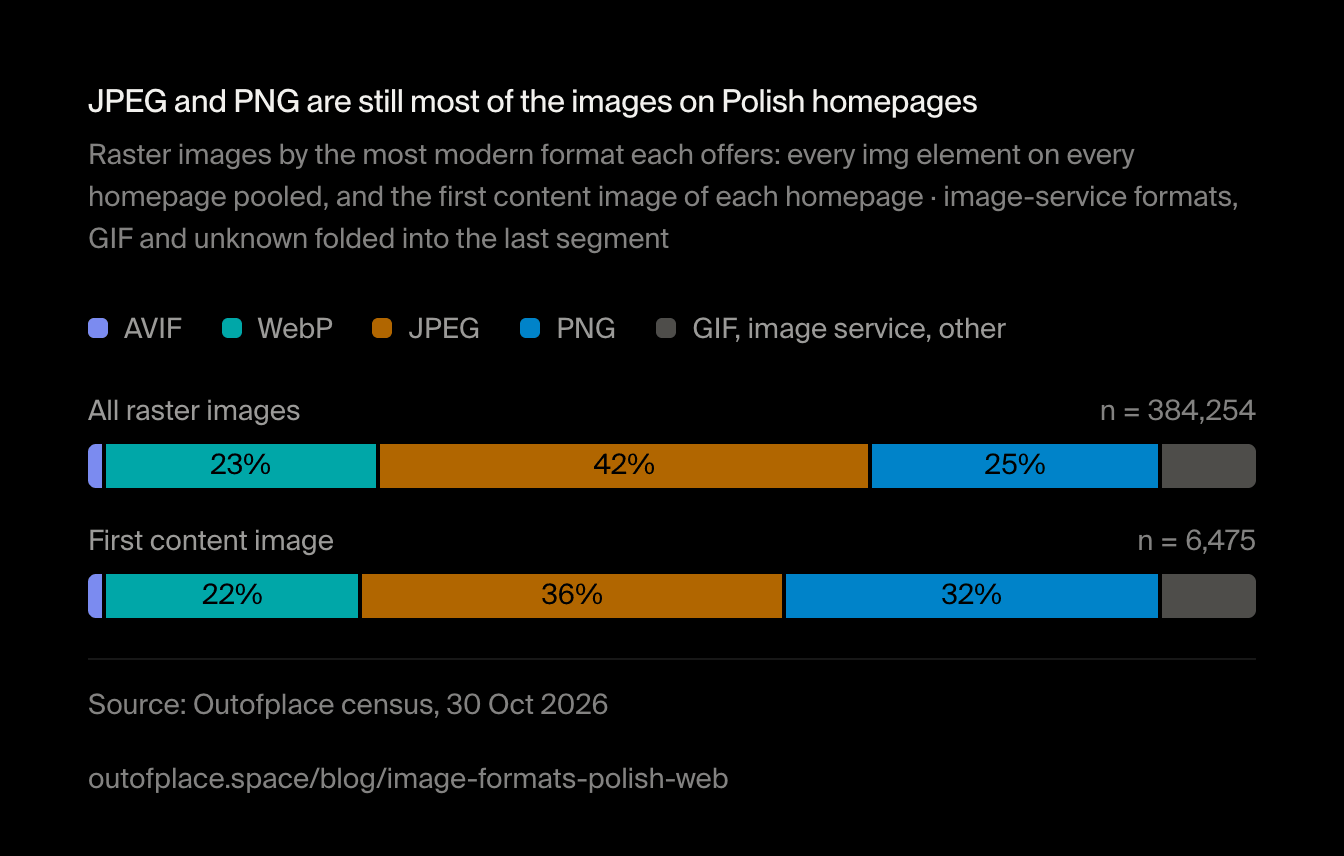
"Serves WebP somewhere" is a low bar: one WebP banner among thirty JPEGs counts. Counted image by image, JPEG and PNG are still most of what Polish homepages send, and the first content image of a page is no more modern than the rest.
JPEG and PNG are still most of the images on Polish homepages
Raster images by the most modern format each offers: every img element on every homepage pooled, and the first content image of each homepage · image-service formats, GIF and unknown folded into the last segment
- AVIF
- WebP
- JPEG
- PNG
- GIF, image service, other
Show the data
| Item | AVIF | WebP | JPEG | PNG | GIF, image service, other | n |
|---|---|---|---|---|---|---|
| All raster images | 1.2% | 23% | 42% | 25% | 8.2% | 384,254 |
| First content image | 1.2% | 22% | 36% | 32% | 8.2% | 6,475 |
The chart as an image, free to reuse under CC BY 4.0 with credit to Outofplace and a link to this page.
Which platforms serve WebP most often?
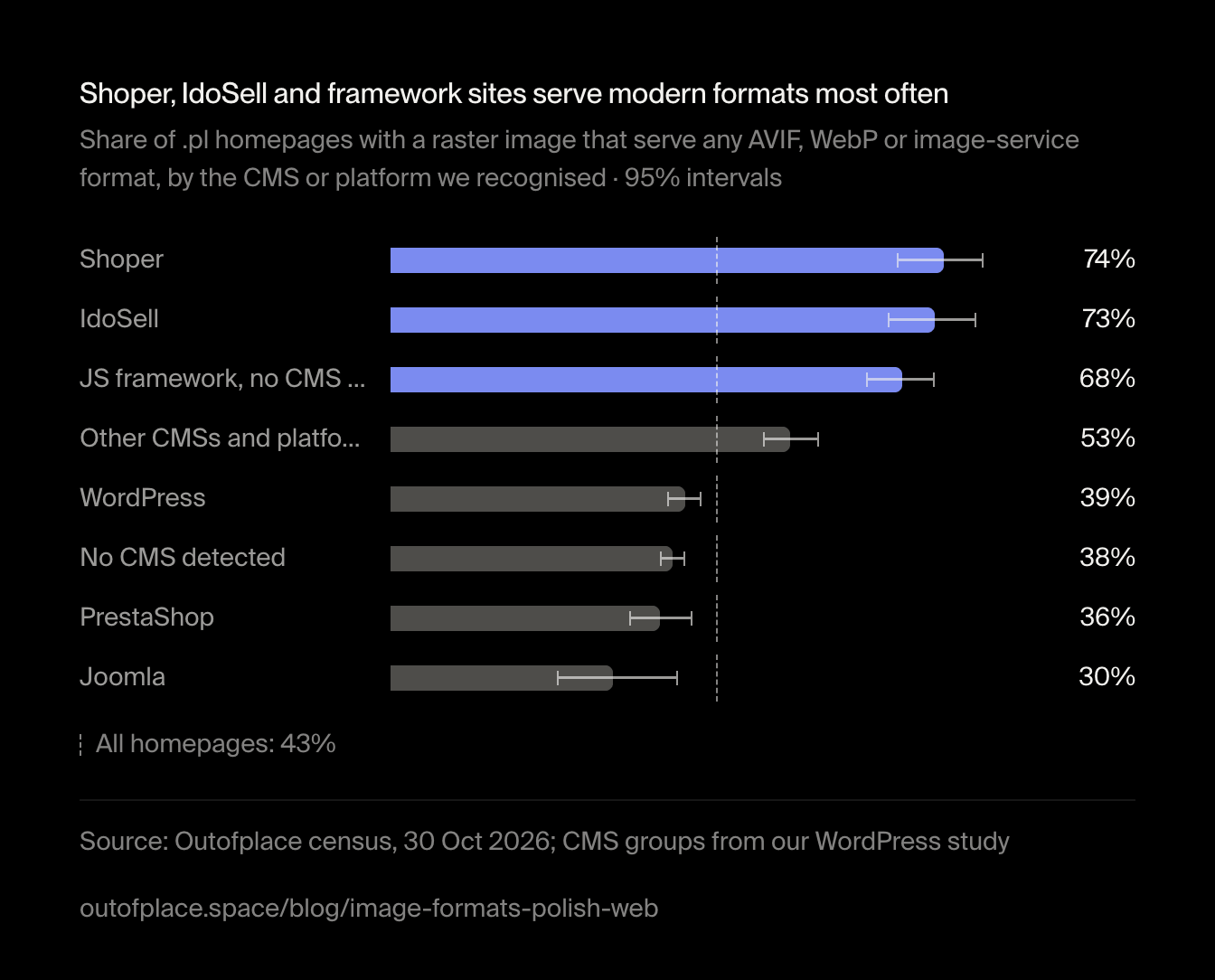
Modern formats go with the platform. Homepages on Shoper and IdoSell, the two Polish hosted shop platforms, serve one far more often than the average, though about a quarter of them still serve no AVIF, WebP or image-service format. Sites built on a JavaScript framework with no CMS we could see are level with them. WordPress and PrestaShop sit below the average, and so do homepages with no CMS we could recognise.
Shoper, IdoSell and framework sites serve modern formats most often
Share of .pl homepages with a raster image that serve any AVIF, WebP or image-service format, by the CMS or platform we recognised · 95% intervals
All homepages: 43%
Show the data
| Item | Value | 95% interval | n |
|---|---|---|---|
| Shoper | 74% | 68%–79% | 221 |
| IdoSell | 73% | 66%–78% | 215 |
| JS framework, no CMS seen | 68% | 64%–73% | 409 |
| Other CMSs and platforms | 53% | 50%–57% | 695 |
| WordPress | 39% | 37%–42% | 1,640 |
| No CMS detected | 38% | 36%–39% | 3,004 |
| PrestaShop | 36% | 32%–40% | 500 |
| Joomla | 30% | 22%–38% | 118 |
The chart as an image, free to reuse under CC BY 4.0 with credit to Outofplace and a link to this page.
Rank makes no difference we can see: the 100 most popular .pl homepages serve a modern format about as often as the rest.
Is AVIF better than WebP?
On file size, usually. The Next.js image documentation (opens in a new tab) puts AVIF at about 20% smaller than WebP and about 50% slower to encode, and still recommends WebP for most cases; that is why Next.js serves WebP unless a site turns AVIF on. Decoding works everywhere that matters now: MDN lists AVIF support (opens in a new tab) from Chrome 85, Firefox 93, Safari 16.1 and Edge 121 (read on 7 November 2026), and WebP in every current version of those browsers.
Our data can't say which format makes a page faster: the few AVIF sites differ from the rest in too many other ways. What it does show is where the gain is for a Polish site. Most homepages haven't made the first step, from JPEG and PNG to either modern format, and for them the AVIF vs WebP choice matters less than making it at all. Google Search indexes both: its image guidelines (opens in a new tab) list WebP and AVIF among the supported formats, next to JPEG and PNG.
Does lazy loading images hurt SEO?
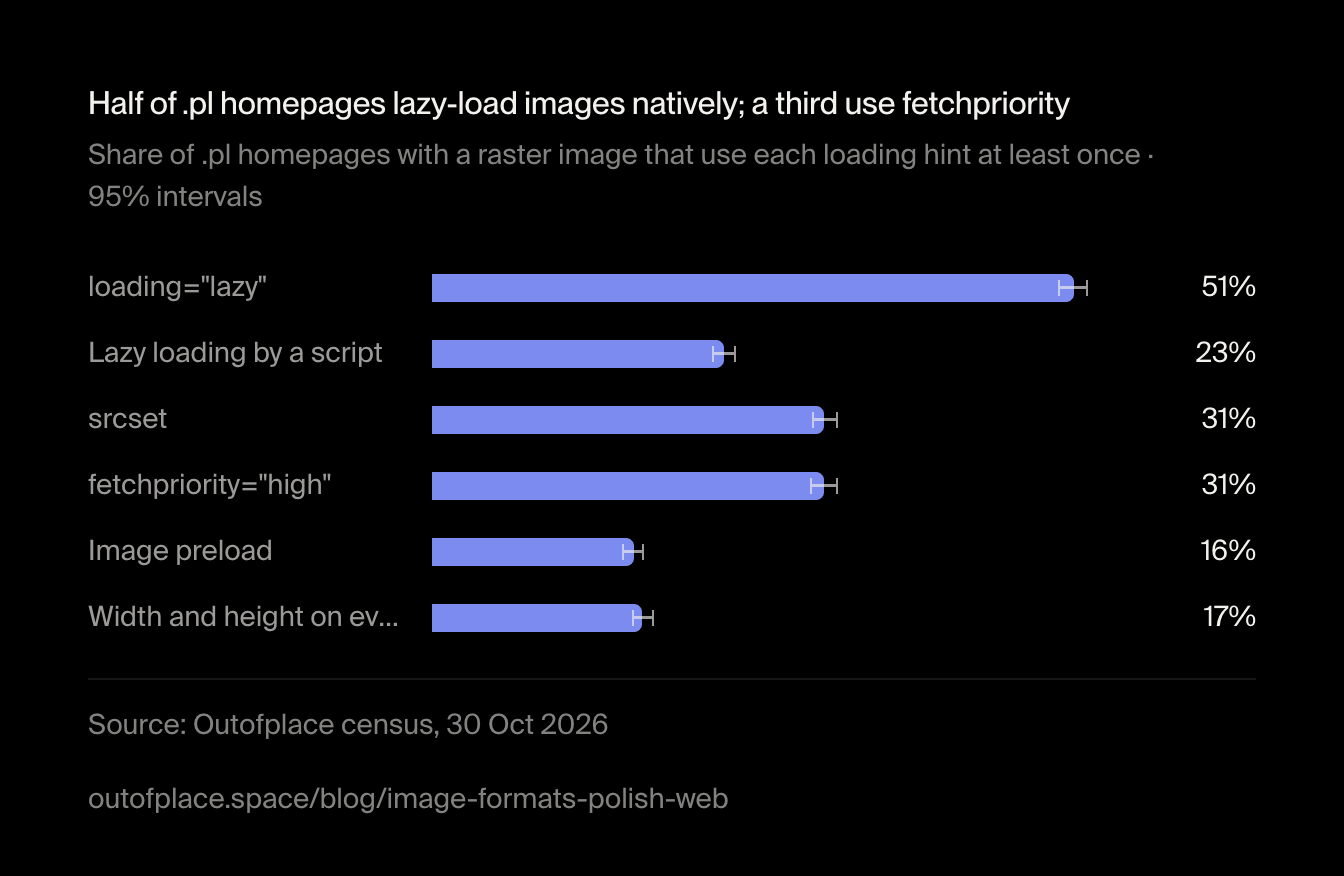
Not when the browser does it. Google's guide to lazy loading (opens in a new tab) names browser built-in lazy loading as a way to load images that Google can still see, and warns only against content that waits for a scroll or a click, since Googlebot doesn't interact with the page. That is the native attribute, loading="lazy", which 51% of Polish homepages with images use.
The older way is a script: the real address sits in data-src, a placeholder in src, and JavaScript swaps them in when the image scrolls into view. 23% of homepages with images still lazy-load at least one image like that. It works for Google when the script reacts to the viewport rather than to scrolling, but it also hides the image from the browser's preload scanner (opens in a new tab), so even a hero image waits for the script.
Half of .pl homepages lazy-load images natively; a third use fetchpriority
Share of .pl homepages with a raster image that use each loading hint at least once · 95% intervals
Show the data
| Item | Value | 95% interval | n |
|---|---|---|---|
| loading="lazy" | 51% | 50%–52% | 6,802 |
| Lazy loading by a script | 23% | 22%–24% | 6,802 |
| srcset | 31% | 30%–32% | 6,802 |
| fetchpriority="high" | 31% | 30%–32% | 6,802 |
| Image preload | 16% | 15%–17% | 6,802 |
| Width and height on every image | 17% | 16%–18% | 6,802 |
The chart as an image, free to reuse under CC BY 4.0 with credit to Outofplace and a link to this page.
Should the hero image be lazy loaded?
No. web.dev's guide to LCP (opens in a new tab) says it plainly: never lazy-load the LCP image, because the browser then waits until layout shows the image is on screen before it starts the download. We can't see which image is a page's LCP element without rendering the page, so we took the next best thing: the first content image in the HTML, meaning the first raster image that isn't a tracking pixel, a logo, an icon or smaller than 100 pixels. In a hand-checked sample, 19 of 24 such picks were real content images.
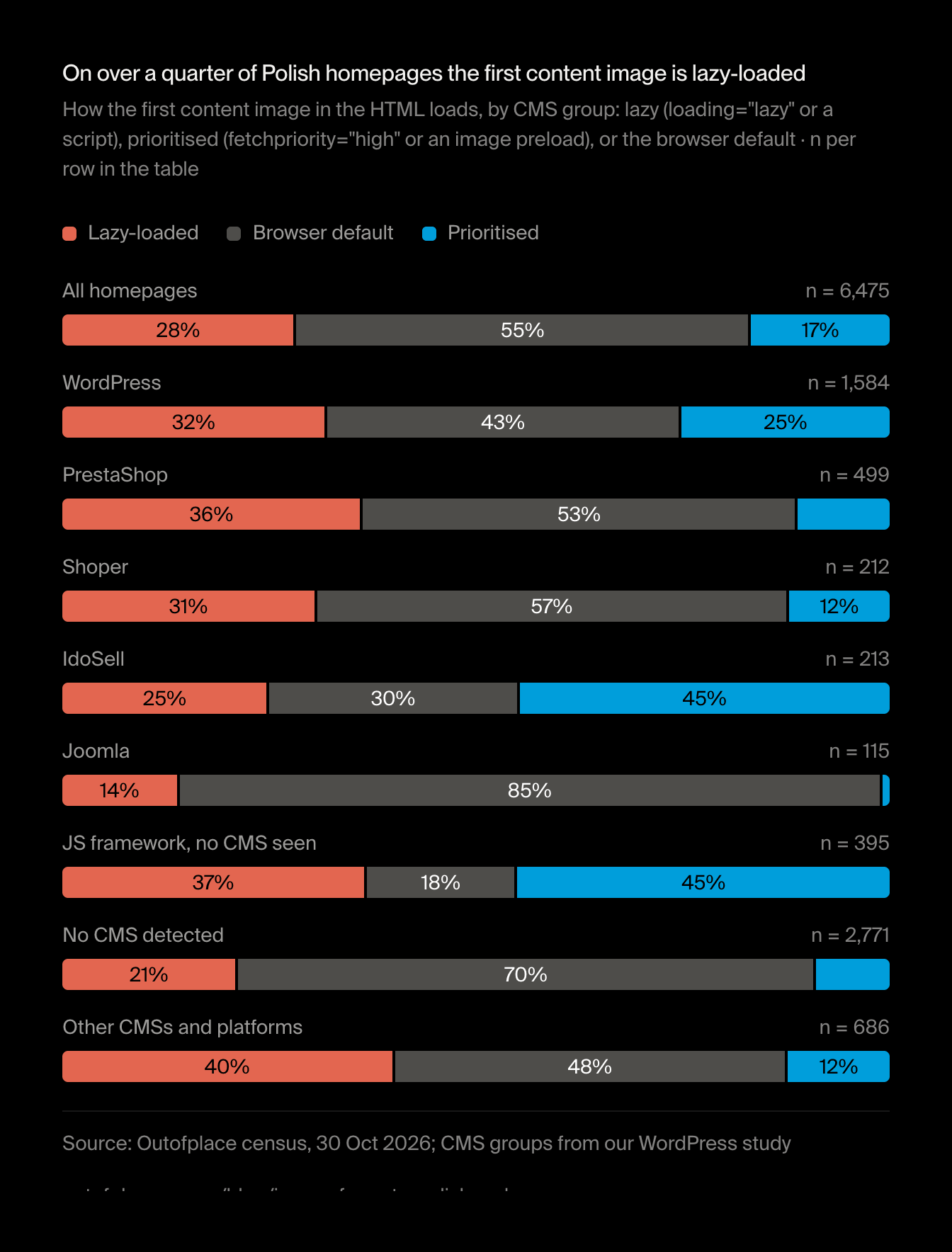
On 28% of homepages that image is lazy-loaded: 19% with loading="lazy" and 9.1% by a script. Some of these pages put a CSS background or text above it, so not every one is a mistake. But 7.1% of homepages with two or more images lazy-load every single one, and on those pages whichever image is the LCP element waits for certain.
On over a quarter of Polish homepages the first content image is lazy-loaded
How the first content image in the HTML loads, by CMS group: lazy (loading="lazy" or a script), prioritised (fetchpriority="high" or an image preload), or the browser default · n per row in the table
- Lazy-loaded
- Browser default
- Prioritised
Show the data
| Item | Lazy-loaded | Browser default | Prioritised | n |
|---|---|---|---|---|
| All homepages | 28% | 55% | 17% | 6,475 |
| WordPress | 32% | 43% | 25% | 1,584 |
| PrestaShop | 36% | 53% | 11% | 499 |
| Shoper | 31% | 57% | 12% | 212 |
| IdoSell | 25% | 30% | 45% | 213 |
| Joomla | 14% | 85% | 0.9% | 115 |
| JS framework, no CMS seen | 37% | 18% | 45% | 395 |
| No CMS detected | 21% | 70% | 8.9% | 2,771 |
| Other CMSs and platforms | 40% | 48% | 12% | 686 |
The chart as an image, free to reuse under CC BY 4.0 with credit to Outofplace and a link to this page.
Framework sites and IdoSell shops prioritise the first image most often, IdoSell almost always with an image preload rather than fetchpriority. WordPress does it on about a quarter of homepages, which fits what its core has done since WordPress 6.3 (opens in a new tab): it adds fetchpriority="high" to the image it judges most likely to be the LCP element and leaves the first images on a page without loading="lazy". Joomla homepages and those with no CMS we recognised lazy-load the first image less often than the average. Homepages with no CMS we recognised also use native lazy loading less overall: 35% have any loading="lazy", against 51% of all homepages with images.
How do you prioritise the LCP image?
With fetchpriority="high" on that one <img>, or an image preload in the <head> when the image is a CSS background the browser would otherwise find late. 15% of homepages give the first content image fetchpriority="high", and 6% preload it.
The hint is often spent on the wrong image. Of the homepages with fetchpriority="high" on any image, 14% put it only on a logo, an icon or an SVG, and on 0.8% of homepages with images one image carries both loading="lazy" and fetchpriority="high", two hints that pull in opposite directions.
What does lazy-loading the hero image cost in LCP?
The Chrome UX Report splits the LCP of an image into four parts: time to first byte, resource load delay (from the first byte until the browser starts fetching the image), load duration and render delay. Lazy loading and fetchpriority act on the second. For 3,757 sites the LCP element is an image on at least half of their phone page loads. We compared the 3,529 of them whose homepage has a first content image by how that image loads.
When the first image is prioritised, phones start fetching the LCP image sooner
Median across sites of the p75 LCP image resource load delay on phones, by how the first content image loads in the HTML · sites whose LCP is an image on at least half of page loads · 95% bootstrap intervals
Show the data
| Item | Value | Range | n |
|---|---|---|---|
| Lazy-loaded | 346ms | 326ms–372ms | 1,062 |
| Browser default | 315ms | 298ms–328ms | 1,783 |
| Prioritised | 231ms | 217ms–249ms | 673 |
The chart as an image, free to reuse under CC BY 4.0 with credit to Outofplace and a link to this page.
The order is the one the advice predicts: a median 231ms with a prioritised first image, 315ms with the browser's default and 346ms with a lazy one. The prioritised group stands clear of the other two; lazy against default is a smaller gap.
The difference barely reaches the headline metric. 85% of Polish sites with field data have good LCP on phones (2.5 s or less at p75), with a median LCP of 1,681ms. Among sites with an image LCP, the share with good LCP is 85% when the first image is lazy-loaded, 87% by default and 88% when prioritised, and the intervals overlap. Load delay is one part of four, and a gap of this size rarely decides whether a page passes.
| First content image | Sites in CrUX | Good LCP | Median LCP (s) | Median load delay (ms) |
|---|---|---|---|---|
| Lazy-loaded | 1,066 | 85% | 1.73 | 346 |
| Browser default | 1,788 | 87% | 1.66 | 315 |
| Prioritised | 675 | 88% | 1.72 | 231 |
The exception is homepages that lazy-load every image they have, compared across every site in CrUX rather than only those with an image LCP. The 372 such sites with load-delay data have a median load delay of 499ms, against 317ms for the other 4,731. Of the 387 such sites with LCP data, 82% have good LCP, against 86% of the rest, a gap whose 95% interval only just stays below zero.
These are correlations, not experiments. The sites differ in platform, hosting, page weight and audience; CrUX covers every page of a site, not only the homepage; and the first content image in the HTML stands in for the LCP element.
CSS background images: what the HTML doesn't show
A hero image set as a CSS background never appears as an <img>, so most of this study can't see it. The HTML gives a floor: 37% of homepages set at least one background image in a style attribute or a <style> block. Background images in external stylesheets, which we didn't fetch, come on top. A background hero can't take loading="lazy" or fetchpriority on its own element; the browser finds it only after the stylesheet arrives, which is what an image preload in the <head> is for.
How to serve AVIF with a WebP fallback and load the hero first
A checklist, in the order the browser meets the image:
Offer AVIF, WebP and a fallback in one picture element
List the sources from the most to the least efficient; the browser takes the first type it supports. Keep a JPEG or PNG in the
<img>for the rest, and give it the image's realwidthandheightso the page doesn't shift while it loads.<picture> <source type="image/avif" srcset="/hero-800.avif 800w, /hero-1600.avif 1600w" sizes="100vw" /> <source type="image/webp" srcset="/hero-800.webp 800w, /hero-1600.webp 1600w" sizes="100vw" /> <img src="/hero-1600.jpg" width="1600" height="900" alt="What the image shows" fetchpriority="high" /> </picture>Or let an image service choose from the Accept header
Next.js's image component, Cloudinary (
f_auto), imgix (auto=format) and Cloudflare Images (format=auto) send AVIF or WebP from a single URL to browsers whoseAcceptheader asks for them. Then one<img>withsrcsetis enough.Never lazy-load the image at the top of the page
Leave
loadingoff the hero image (or setloading="eager"), and don't hand it to a lazy-loading script. Check plugins and page builders: on WordPress, a lazy-loading plugin can undo what the core does.Give high fetch priority to one image
Put
fetchpriority="high"on the image most likely to be the LCP element, not on the logo. If the hero is a CSS background, preload it instead:<link rel="preload" as="image" href="/.hero.avif" type="image/ avif" fetchpriority="high"> Lazy-load everything below the fold, natively
Use
loading="lazy"on images further down the page. It needs no script, and Google indexes images loaded this way.Check the result on real phones
Open PageSpeed Insights (opens in a new tab) for your homepage: its field data is the same Chrome UX Report we used, and its LCP breakdown shows how long the image waited before it started loading. Lab and field numbers often differ; our guide explains why lab and field data disagree.
How we measured
How we checked the first-content-image rule
We drew a seeded random sample of homepages, half whose first content image the rules called lazy-loaded and half whose image they didn't, and read the picked image's tag and its neighbours by hand. 19 of the 24 picks were content images (photos, banners, products, article images); the other five were a navigation graphic, a partner logo, a decoration, an app icon sized by CSS and a public-information badge. The format, loading and fetchpriority were read right in all 24. So the first-image shares are a rough guide to the hero, not a count of LCP images; the labels are in the dataset.
What this data can't tell you
We saw the homepage only, as its HTML arrived, and ran none of it. Images a script inserts after loading, images in external stylesheets and the format a CDN negotiates without a sign in the URL (such as Cloudflare Polish) are invisible to us, so the modern-format shares are a floor. The first content image in the HTML is not always the LCP element: a slider's second slide, a CSS background or a heading can be. Homepages over 1 MiB (319) were cut, which can hide images further down. The field data covers every page of a site, not just the homepage, and every difference in it is a correlation between sites, which also differ in hosting, platform, page weight and audience.
Is AVIF better than WebP?
AVIF usually makes smaller files: the Next.js documentation puts it at about 20% smaller than WebP, at about 50% longer to encode, and still recommends WebP for most cases. Every current major browser decodes both. On popular Polish homepages AVIF is rare and WebP common, so for most sites the step that matters is moving off JPEG and PNG at all.
Should I use AVIF or WebP in 2026?
Serve both if your tooling makes it cheap: AVIF first with a WebP fallback, through a <picture> element or an image service that reads the browser's Accept header. If you can only have one, WebP is the safe default. On the .pl homepages we read on 30 October 2026, 41% served WebP and 2.4% AVIF.
Does lazy loading images hurt SEO?
Not when the browser does it. Google's documentation lists browser built-in lazy loading as a way to load images that Google can still see, as long as images load when they enter the viewport and don't wait for a scroll or a click, since Googlebot doesn't interact with the page. What lazy loading can hurt is LCP, when it is applied to the main image at the top of the page.
Should the hero image be lazy loaded?
No. web.dev's guidance is never to lazy-load the LCP image, because the browser then waits for layout before it starts the download. On 28% of the Polish homepages we read, the first content image in the HTML is lazy-loaded, natively or by a script.
Which browsers support AVIF?
According to MDN, AVIF works in Chrome from version 85, Firefox from 93, Safari from 16.1, Edge from 121 and Opera from 71. WebP works in every current version of those browsers. Older devices still exist, so serve AVIF with a WebP or JPEG fallback.
How do I serve AVIF with a WebP fallback?
Use a <picture> element: a <source type="image/avif"> first, a <source type="image/webp"> second, and an <img> with a JPEG or PNG, width, height and alt last. The browser takes the first source it supports. An image CDN that reads the Accept header does the same from one URL.