Next.js prefetch, measured: Partial Prefetching in 16.3
Partial Prefetching in Next.js 16.3 cut prefetched bytes by up to 93% in our benchmark, but URL content now lands after the click. When each setup wins.

Next.js 16.3 (opens in a new tab) changes what Next.js prefetch means. With partialPrefetching (opens in a new tab) on, the App Router (opens in a new tab) no longer fetches a payload for every link on screen: it fetches one reusable shell per route and leaves the URL-specific content for after the click. We built one app six ways and clicked through it 3,744 times to see what that trade buys and what it costs.
On a docs page with a 100-link sidebar, prefetched bytes fell by 93%. The price is time: the content that used to be on screen almost at once now arrives a few hundred milliseconds after the click, behind a skeleton. Which side of that trade you want depends on the page, and on one detail of React that is easy to miss.
- 93%
- 11×
- 298ms
- 43ms
What Partial Prefetching changes
Until 16.3, the App Router prefetched per link: as N links scrolled into view, it fetched about N route payloads. With partialPrefetching (it requires cacheComponents (opens in a new tab)), it fetches one App Shell (opens in a new tab) per route: everything the page renders that doesn't depend on the URL. Links to the same route share that one prefetch. Content that reads params or searchParams resolves after the click, unless a link asks for more with prefetch={true}.
We compared six builds of the same app:
- L0, no Cache Components: the classic App Router.
- C0, Cache Components alone.
- P0, Cache Components with Partial Prefetching and the default prefetch inlining.
- P1–P3, the same with inlining off, with small thresholds and with large ones.
Each was clicked through three navigations: a catalog of 48 products to a product page, a docs page with a 100-link sidebar to another docs page, and a search results page to another search through one of eight prefetch={true} links.
Prefetch bytes: up to 93% fewer
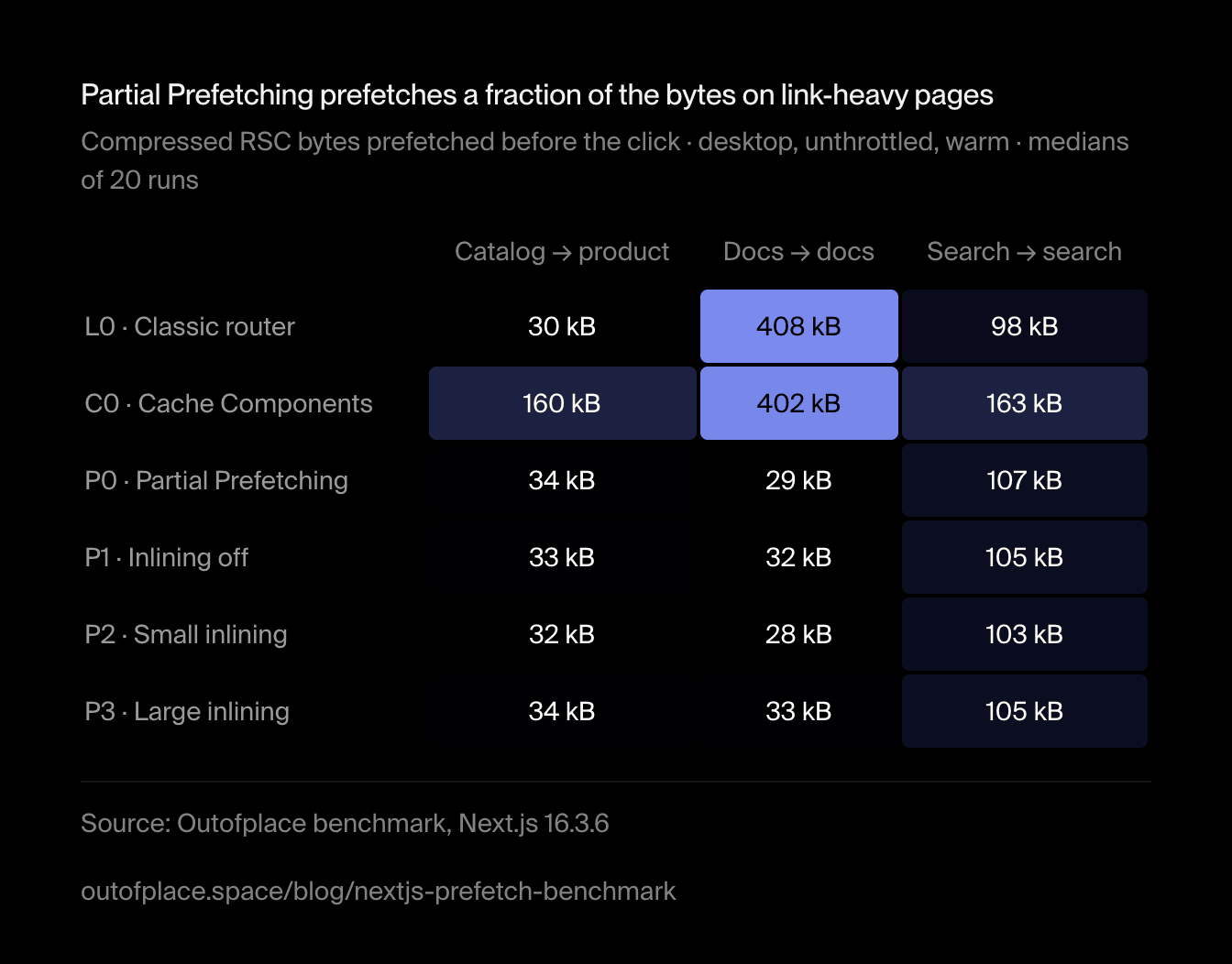
On the docs page, Cache Components alone prefetched every visible sidebar link. Partial Prefetching took that from 402 kB → 29 kB−93%better, in 8.5 requests instead of 49. On the catalog the saving was 78%. Search barely moved, because its eight prefetch={true} links still fetch their own results.
Partial Prefetching prefetches a fraction of the bytes on link-heavy pages
Compressed RSC bytes prefetched before the click · desktop, unthrottled, warm · medians of 20 runs
| Item | Catalog → product | Docs → docs | Search → search |
|---|---|---|---|
| L0 · Classic router | 30 kB | 408 kB | 98 kB |
| C0 · Cache Components | 160 kB | 402 kB | 163 kB |
| P0 · Partial Prefetching | 34 kB | 29 kB | 107 kB |
| P1 · Inlining off | 33 kB | 32 kB | 105 kB |
| P2 · Small inlining | 32 kB | 28 kB | 103 kB |
| P3 · Large inlining | 34 kB | 33 kB | 105 kB |
Show as an image
The chart as an image, free to reuse under CC BY 4.0 with credit to Outofplace and a link to this page.
One row deserves a second look. Turning on Cache Components without Partial Prefetching made the catalog prefetch five times more than the classic router, 30 kB → 160 kB+426%worse: its prerendered product shells become prefetchable per link. If you adopt Cache Components on link-heavy pages, decide on Partial Prefetching at the same time.
Is navigation actually instant?
The shell is. Under Partial Prefetching it painted 43ms–45ms after the click on a throttled phone. The part people came for, the product or the article, is another story: it needs a request after the click.
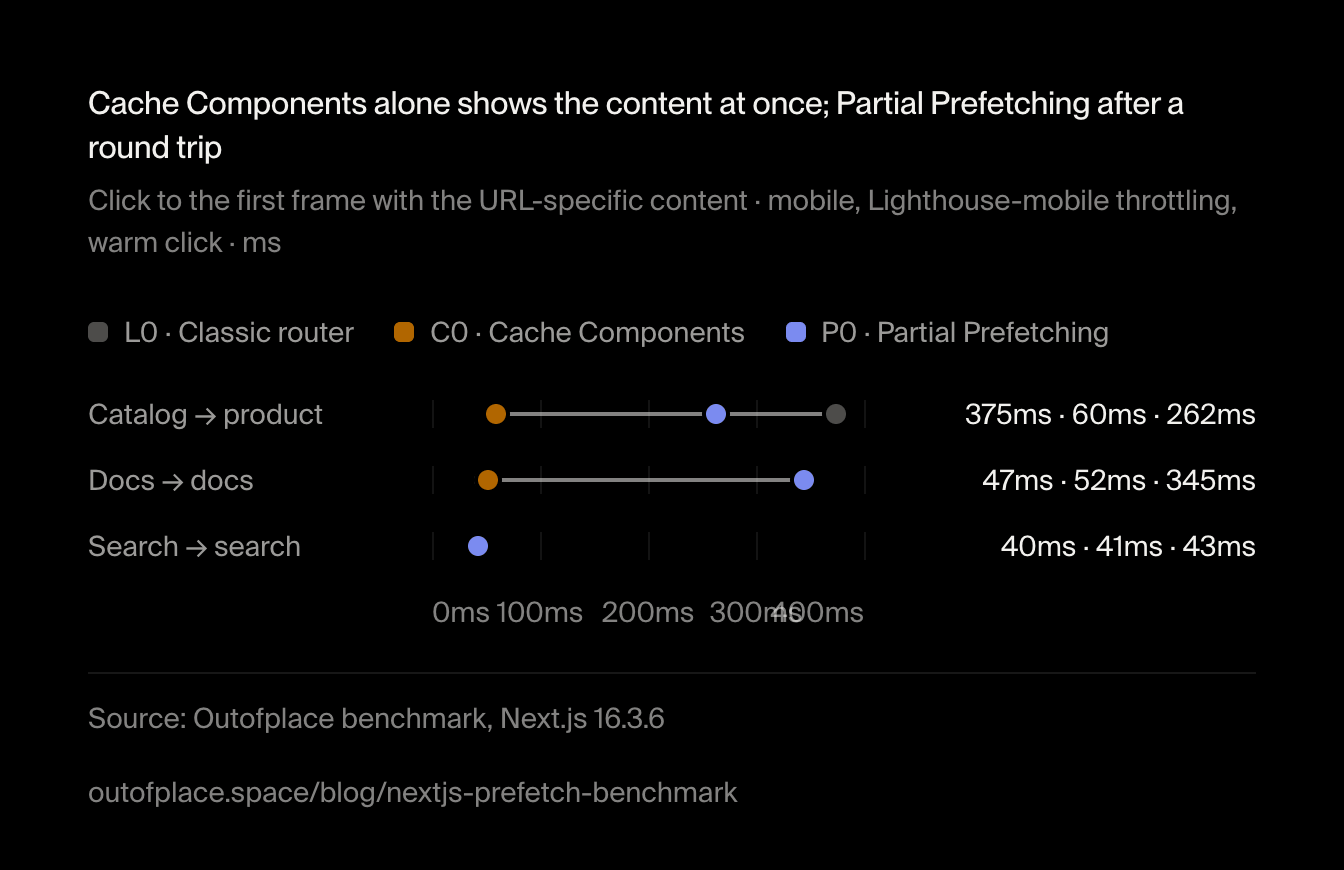
Cache Components alone shows the content at once; Partial Prefetching after a round trip
Click to the first frame with the URL-specific content · mobile, Lighthouse-mobile throttling, warm click · ms
- L0 · Classic router
- C0 · Cache Components
- P0 · Partial Prefetching
Show the data
| Item | L0 · Classic router | C0 · Cache Components | P0 · Partial Prefetching |
|---|---|---|---|
| Catalog → product | 375ms | 60ms | 262ms |
| Docs → docs | 47ms | 52ms | 345ms |
| Search → search | 40ms | 41ms | 43ms |
The chart as an image, free to reuse under CC BY 4.0 with credit to Outofplace and a link to this page.
On docs, Cache Components alone painted the new article in 52ms; Partial Prefetching took 345ms. On the product page the gap was smaller, 60ms → 262ms+337%worse, and the classic router was slowest of all, because it had nothing prerendered for the dynamic route. Search, where every link carries prefetch={true}, painted in 40ms–43ms in every setup.
The skeleton you will see: 300 ms
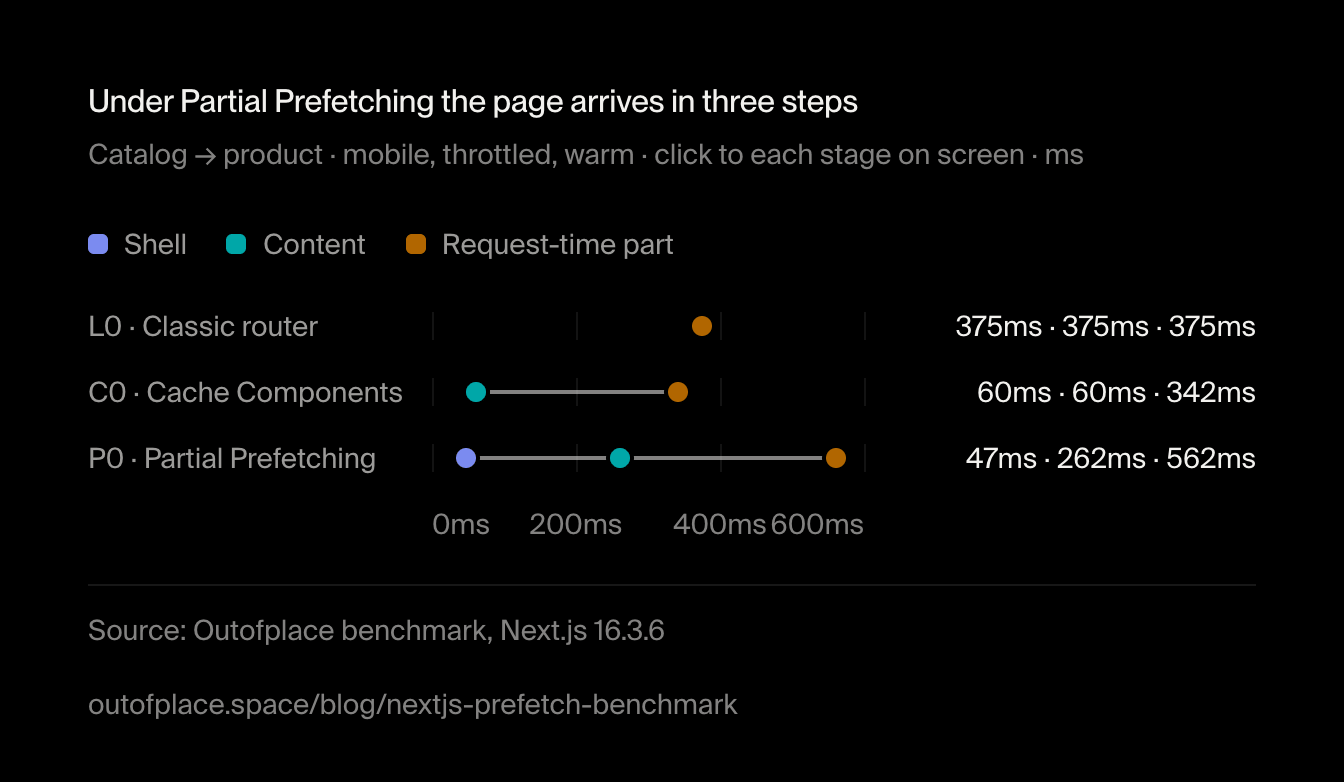
On the product page the three stages land one after another: the shell, the product, then the part rendered at request time.
Under Partial Prefetching the page arrives in three steps
Catalog → product · mobile, throttled, warm · click to each stage on screen · ms
- Shell
- Content
- Request-time part
Show the data
| Item | Shell | Content | Request-time part |
|---|---|---|---|
| L0 · Classic router | 375ms | 375ms | 375ms |
| C0 · Cache Components | 60ms | 60ms | 342ms |
| P0 · Partial Prefetching | 47ms | 262ms | 562ms |
The chart as an image, free to reuse under CC BY 4.0 with credit to Outofplace and a link to this page.
On docs, the skeleton stayed up 298ms in every Partial Prefetching build. That is not network time: the response had arrived after 250ms.
An early click
Clicking 50 ms after the page hydrates, before any prefetch finishes, takes the advantage away from everyone who prefetches. Cache Components alone is as slow as Partial Prefetching then, because both show a fallback first and then wait out the 300 ms.
Clicked early, no setup has prefetched yet
Click 50 ms after hydration · mobile, throttled · click to URL content · ms
- L0 · Classic router
- C0 · Cache Components
- P0 · Partial Prefetching
Show the data
| Item | L0 · Classic router | C0 · Cache Components | P0 · Partial Prefetching |
|---|---|---|---|
| Catalog → product | 367ms | 374ms | 389ms |
| Docs → docs | 262ms | 528ms | 529ms |
| Search → search | 234ms | 404ms | 339ms |
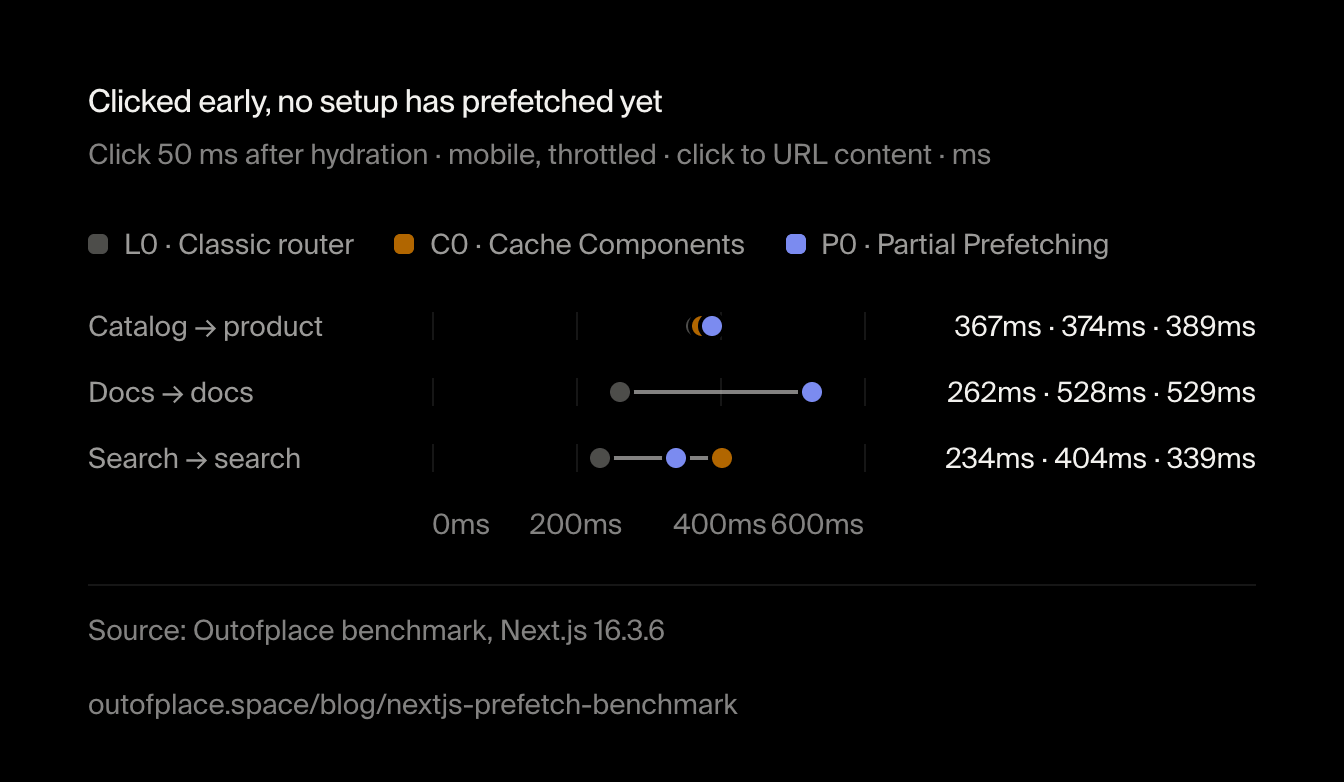
The chart as an image, free to reuse under CC BY 4.0 with credit to Outofplace and a link to this page.
The last stage, the part rendered at request time, splits these clicks in two. With Partial Prefetching, 6 of 12 early clicks on the product page had the whole page on screen after 375ms–400ms. The other 6 took 650ms–700ms, and no run landed in between. The gap is about the 300 ms React waits between two reveals: the last stage arrives with the product or one wait later.
The last stage lands with the product or about 300 ms later
Catalog → product, early click · Partial Prefetching · mobile, throttled, HTTP/2 run · click to the last stage on screen · ms
Show the data
| Range | runs |
|---|---|
| 375ms–400ms | 6 |
| 400ms–425ms | 0 |
| 425ms–450ms | 0 |
| 450ms–475ms | 0 |
| 475ms–500ms | 0 |
| 500ms–525ms | 0 |
| 525ms–550ms | 0 |
| 550ms–575ms | 0 |
| 575ms–600ms | 0 |
| 600ms–625ms | 0 |
| 625ms–650ms | 0 |
| 650ms–675ms | 3 |
| 675ms–700ms | 3 |
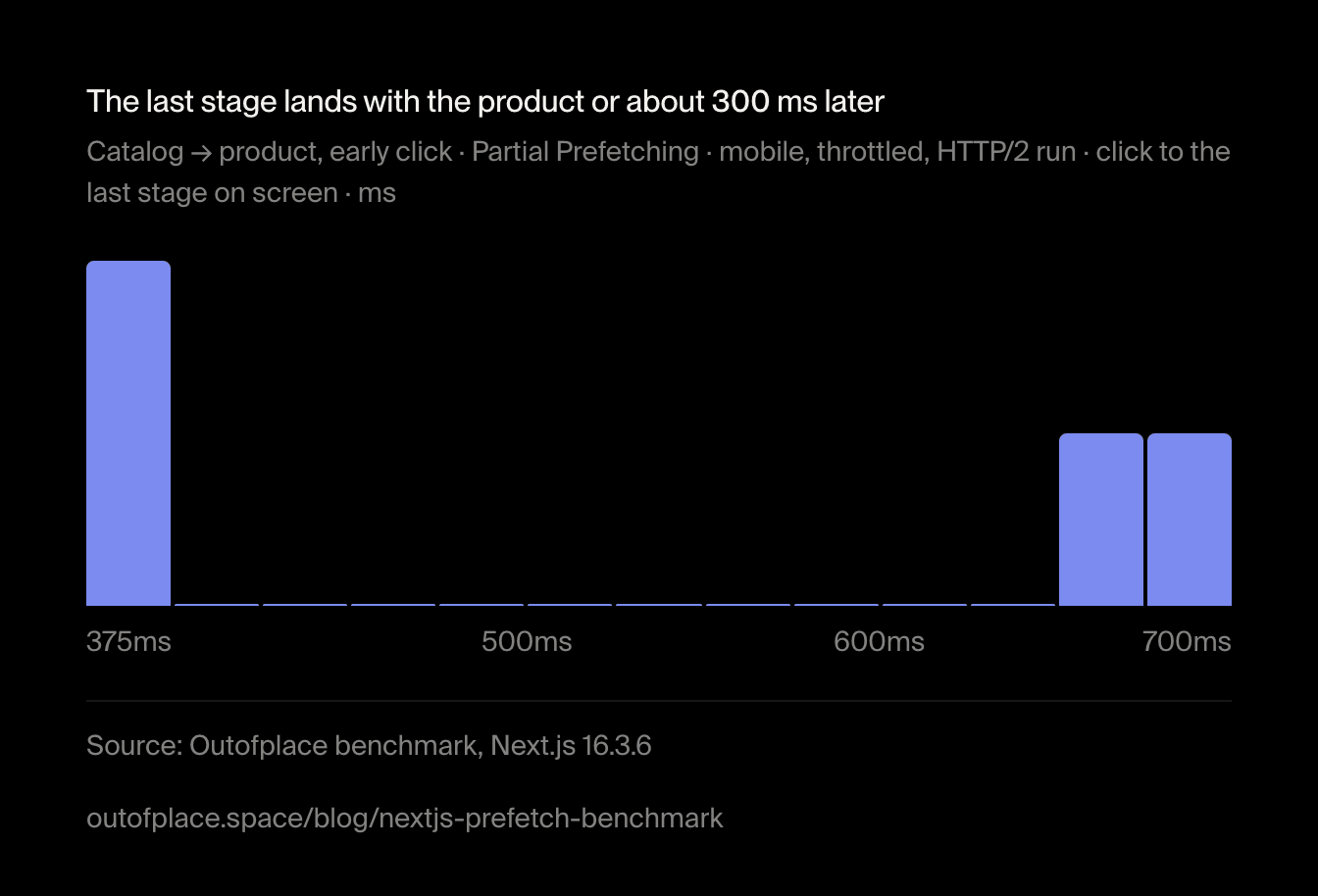
The chart as an image, free to reuse under CC BY 4.0 with credit to Outofplace and a link to this page.
The whole bill
Partial Prefetching moves bytes from before the click to after it, and on the product page it also doubles them: the navigation response carried two complete copies of the product's payload, 13 kB → 26 kB+99%worse compressed. Counting everything a navigation downloads, prefetch included, it still comes out far ahead on docs.
A whole docs navigation costs about a tenth of the bytes
All compressed RSC bytes of one docs navigation, prefetch and navigation · mobile, throttled, warm
Show the data
| Item | Value | n |
|---|---|---|
| L0 · Classic router | 463 kB | 20 |
| C0 · Cache Components | 458 kB | 20 |
| P0 · Partial Prefetching | 40 kB | 20 |
| P1 · Inlining off | 43 kB | 20 |
| P2 · Small inlining | 39 kB | 20 |
| P3 · Large inlining | 44 kB | 20 |
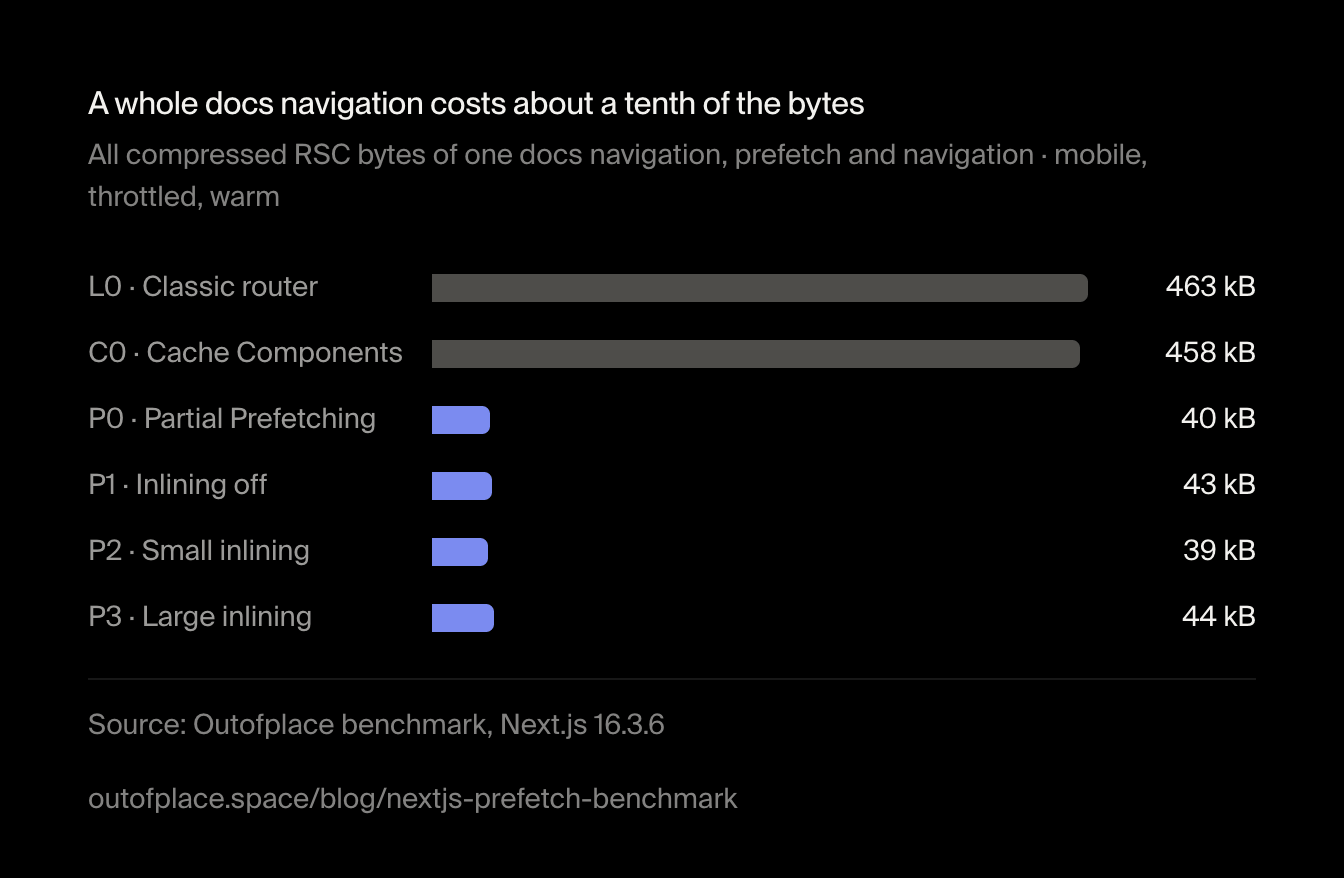
The chart as an image, free to reuse under CC BY 4.0 with credit to Outofplace and a link to this page.
About 11 times fewer bytes on docs, 2.2 times fewer on the catalog. Hydration and input delay on the start page didn't change in any setup.
When prefetch={true} is worth it
<Link prefetch={true}> (opens in a new tab) fetches the destination's URL data too, so its click is as instant as a full prefetch. It is paid per visible link: the eight search links cost 107 kB, more than the whole docs page under Partial Prefetching. Use it where the click is likely and the data cacheable: search suggestions, a "next" link, the first few results. On grids of cards, prefetch on intent (hover or touch) instead of marking every card.
prefetchInlining: leave it on
experimental.prefetchInlining (opens in a new tab) bundles small prefetch responses into one. The default and our two threshold settings differed by at most one request and a few kilobytes, with no measurable difference in time.
| Setup | Scenario | Requests | Prefetched |
|---|---|---|---|
| P0 · Partial Prefetching | Catalog → product | 11 | 34.4 kB |
| P0 · Partial Prefetching | Docs → docs | 8.5 | 29.4 kB |
| P0 · Partial Prefetching | Search → search | 17 | 106.5 kB |
| P1 · Inlining off | Catalog → product | 16 | 33.4 kB |
| P1 · Inlining off | Docs → docs | 7 | 32 kB |
| P1 · Inlining off | Search → search | 23 | 105 kB |
| P2 · Small inlining | Catalog → product | 11 | 31.8 kB |
| P2 · Small inlining | Docs → docs | 7 | 27.9 kB |
| P2 · Small inlining | Search → search | 17 | 102.8 kB |
| P3 · Large inlining | Catalog → product | 10 | 33.8 kB |
| P3 · Large inlining | Docs → docs | 7 | 33.1 kB |
| P3 · Large inlining | Search → search | 16 | 105.1 kB |
Turning inlining off added five or six requests on the catalog and search, and over HTTP/1.1 that cost an early click on the catalog: six connections per host fill up. Over HTTP/2 (opens in a new tab) the penalty disappeared. Every other setup was the same on both protocols.
HTTP/2 only matters with inlining turned off
Catalog → product, early click · mobile, throttled · click to content · HTTP/1.1 and HTTP/2 interleaved, 12 runs each · ms
- HTTP/1.1
- HTTP/2
Show the data
| Item | HTTP/1.1 | HTTP/2 |
|---|---|---|
| L0 · Classic router | 365ms | 363ms |
| C0 · Cache Components | 375ms | 373ms |
| P0 · Partial Prefetching | 387ms | 386ms |
| P1 · Inlining off | 440ms | 372ms |
| P2 · Small inlining | 390ms | 383ms |
| P3 · Large inlining | 387ms | 386ms |
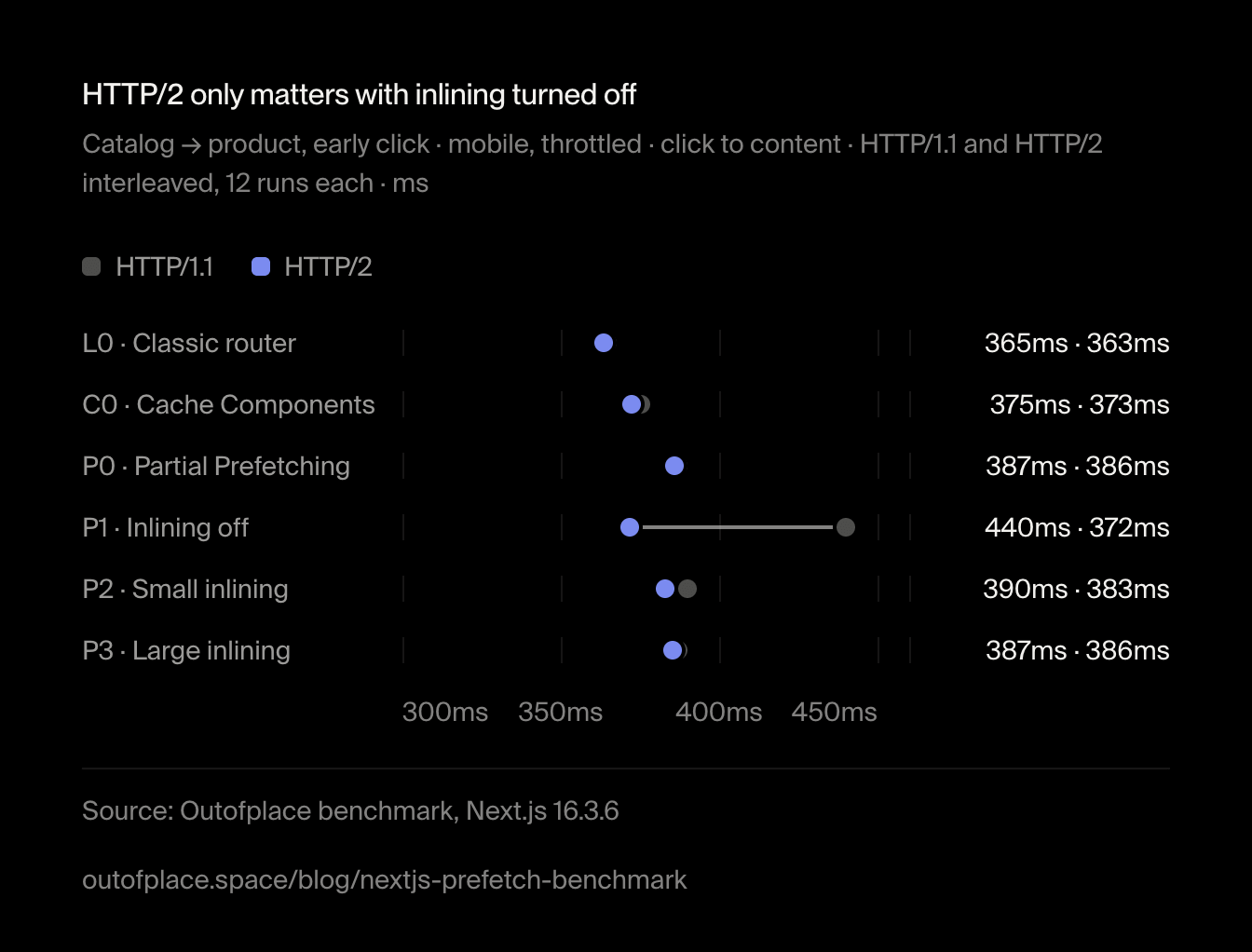
The chart as an image, free to reuse under CC BY 4.0 with credit to Outofplace and a link to this page.
Which setup to choose
Cache Components alone
- URL content on screen at once after a warm click
- One prefetch per visible link
- Hundreds of kilobytes on link-heavy pages
With Partial Prefetching
- Shell at once, URL content after a round trip
- One prefetch per route
- 78–93% fewer prefetched bytes where links pile up
const nextConfig: NextConfig = {
  cacheComponents: true,
  // One App Shell per route instead of one prefetch per link.
  partialPrefetching: true,
};<Link href={`/search?q=${suggestion}`} prefetch={true}>
{suggestion}
</Link>Count the links
Pages with many links to the same dynamic route (docs, grids, feeds) gain the most. A page with a handful of links to different pages gains little.
Decide per route
Where instant content matters more than bytes and the pages are static, keep a route on full prefetch; elsewhere turn Partial Prefetching on. The segment config
export const prefetch = 'partial'(opens in a new tab) adopts it one route at a time.Mark the likely clicks
Add
prefetch={true}where the next click is predictable and the data cacheable.Design the skeleton
It will be seen for about 300 ms on a slow connection. Put the title and navigation in the part that doesn't depend on the URL: it paints almost at once.
This site runs Partial Prefetching: most of our pages have few links, and the ones that have many (the blog, the case studies) are static and small. Our own products, Portivo, Sprawna Matura and Levera, are built on Next.js too.
How we measured
What this can't tell you
It is a lab: one machine, localhost, no CDN, no images or fonts, generated text, and a synthetic 300 ms request-time delay. Throttling is per request, not packet-level, so absolute times are optimistic; the comparisons are what count. A late click is the best case for prefetching and an early one a specific race; real users click everywhere in between. The App Shell mechanics, the doubled product payload and the 300 ms reveal are specific to Next.js 16.3.6 and its React canary and may change in a patch release.
The App Shell arrives through a real link
The shared shell is fetched through the URL of whichever link the router schedules first, and that response carries the whole page for that URL. A click on exactly that link needs no request at all. We picked click targets further down the page so that this didn't flatter Partial Prefetching.
What is prefetch in Next.js?
When a <Link> scrolls into view, the App Router fetches the destination's React Server Components payload in the background, so a click can render without waiting for the network. Next.js 16.3 adds Partial Prefetching, which fetches one reusable shell per route instead of a payload per link.
Is Next.js navigation instant with Partial Prefetching?
The shell is: it painted in about 45ms on a throttled phone in our benchmark. The URL-specific content comes after the click, about 262ms later on a product page and 345ms on a docs page, where Cache Components alone painted it in about 52ms. Links with prefetch={true} stay instant.
Should I disable prefetch in Next.js?
Usually not. Prefetching made warm clicks up to 300 ms faster and did not slow hydration or input. If prefetch traffic is the problem, Partial Prefetching cuts it by up to 93% on link-heavy pages without giving up the shell.
What is the difference between Partial Prefetching and Partial Prerendering?
Partial Prerendering decides what the server renders ahead of time: a static shell with dynamic holes. Partial Prefetching decides what the browser fetches before a click: one shell per route, with URL data resolved after navigation. Partial Prefetching needs Cache Components.
Does HTTP/2 matter for Next.js prefetching?
Barely, as long as prefetch inlining is on (the default). In our HTTP/2 arm the only large difference was with inlining turned off and an early click, where HTTP/2 removed a 68 ms penalty caused by HTTP/1.1's six connections per host.